Accounts Receivable · Automation
Payer-Claim Aging Report Automation
A desktop-controlled workflow that downloads provider aging exports from an enterprise reporting portal and builds a multi-sheet Excel workbook with bucket-level accounts-receivable analysis.
- Role
- Data reporting analyst — design, build, and maintain operational automation
- Duration
- iterative build over several months
- Data scale
- one CSV export per provider per reporting cycle; UTF-16 tab-delimited portal exports
- Stack
- Python
- Playwright
- pandas
- openpyxl
- Tkinter
Impact
3hours
saved per reporting cycle on the download stage
vs. manual per-provider CSV export from the enterprise reporting portal per aging run
30%
improvement in download-stage throughput
vs. prior manual per-provider report download workflow before browser automation
Problem
Groups in this position run payer-claim aging through a web-based enterprise reporting portal. The report is standard AR work: open balances split across aging buckets so billing staff can prioritise follow-up, escalate stalled claims, and brief leadership on days in AR. The portal exports one CSV at a time, filtered by appointment provider, and every export arrives with the same default filename.
At a mid-sized multi-specialty scale, that means dozens of identical manual sequences per cycle: log in, set the date range, open the provider filter, wait for the format menu, export, rename the file, repeat. A full roster can consume the better part of a morning before anyone opens Excel. The work is repetitive, easy to interrupt, and sensitive to small mistakes — selecting the wrong provider, saving over the previous export because the filename never changed, or skipping a name on the roster. Each error compounds downstream because the Excel stage treats the CSV filename as the provider identity column.
The business cost is not a single dramatic failure. It is throughput: AR review starts late, bucket totals lag the period close, and staff spend cognitive effort on export mechanics instead of on the balances that need action.
Approach
I built a two-stage pipeline behind a small desktop UI: a download stage and an Excel stage that can run together or independently.
Download stage. Playwright drives a headed browser against the portal. The portal viewer does not behave reliably headless, so the automation runs with a visible window and listens for download events. On each run it reads a provider roster from a local spreadsheet, applies the selected date range, and iterates providers one at a time: open the filter, select the name, wait until the export menu is enabled, save the CSV, rename it to the provider name, move on. A separate PCR data export runs once at the end with optional CPT filters from a second input file. The same session is reused when possible.
Two connection modes cover different browser constraints. In direct mode the script launches its own browser context; the second mode reuses an authenticated persistent browser session. Internal network, access, and authentication configuration is intentionally omitted from this public case study.
Excel stage. A pandas and openpyxl processor scans the download folder, skips non-provider artifacts, reads each file as UTF-16 tab-delimited data, adds a provider name column derived from the filename, and concatenates rows into a single aging data sheet. It groups bucket columns by provider on an aging analysis sheet, adds a grand total row, and writes additional PCR and non-PCR sheets when that data is present. Formatting — merged title row, number formats, borders, freeze panes, landscape layout — is applied in openpyxl so the output is ready for review without manual cleanup.
Bucket definitions follow the source export: Current, 31–60, 61–90, 91–120, and greater than 120 days. Bucket boundaries vary by billing system; I preserved the portal's five-bucket layout rather than forcing a different convention at export time.
# Rename-on-save: the CSV filename becomes the provider key downstream.
safe_name = re.sub(r"[^\w\s\-]", "", provider_name).strip()
dest = download_dir / f"{safe_name}.csv"
What I found
The download stage was the bottleneck worth automating first. Against the prior manual per-provider export workflow, the automation saved roughly three hours per reporting cycle on download alone and improved download-stage throughput by about thirty percent — mostly from eliminating wait-and-click loops and removing rename errors that previously required rework.
Human error dropped in ways that are harder to put a single number on but easy to observe: no more overwritten exports with the portal's default filename, no more roster gaps from a skipped provider, and a reproducible file naming scheme that the Excel stage can trust. Staff could trigger a full run from the UI, walk away, and return to a complete download folder.
The Excel stage added analytical structure without a second manual pass: provider totals by bucket, PCR split sheets when CPT filters were supplied, and formatted output that matched how the billing team already reviewed aging. Separating "download" from "process downloaded files" also proved useful when a run interrupted mid-roster — rebuild the workbook from whatever CSVs were already on disk without re-authenticating to the portal.
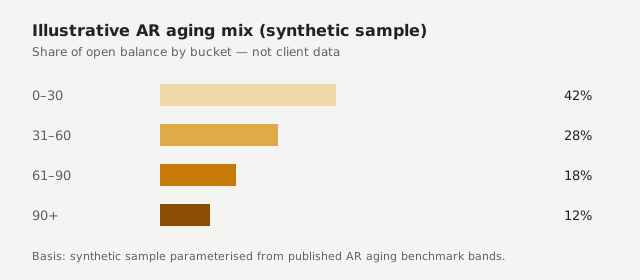
| Bucket | Share of balance |
|---|---|
| 0–30 days | 42% |
| 31–60 days | 28% |
| 61–90 days | 18% |
| 90+ days | 12% |
What I'd do differently
The automation is tightly coupled to the portal's DOM structure. A layout change to the provider filter or export menu breaks the script until someone updates selectors — there is no automated visual regression or smoke test against a staging tenant. I would add a minimal health-check mode that logs in, confirms the report shell loads, and exits, scheduled before each production cycle.
I would also externalise provider roster and CPT filter paths into environment config rather than hard-coded UI defaults, and add structured logging with run identifiers so support can correlate a failed provider with the portal state at that moment. Finally, the headed-browser requirement is correct for reliability but wrong for unattended server deployment; if this needed to run overnight on a VM, I would negotiate a supported export API or batch job with the portal vendor rather than fighting headless mode.
Source code
Repository for this demonstration project.
View repository →